AttackCompass Security Model

Your client's secrets.Your control.

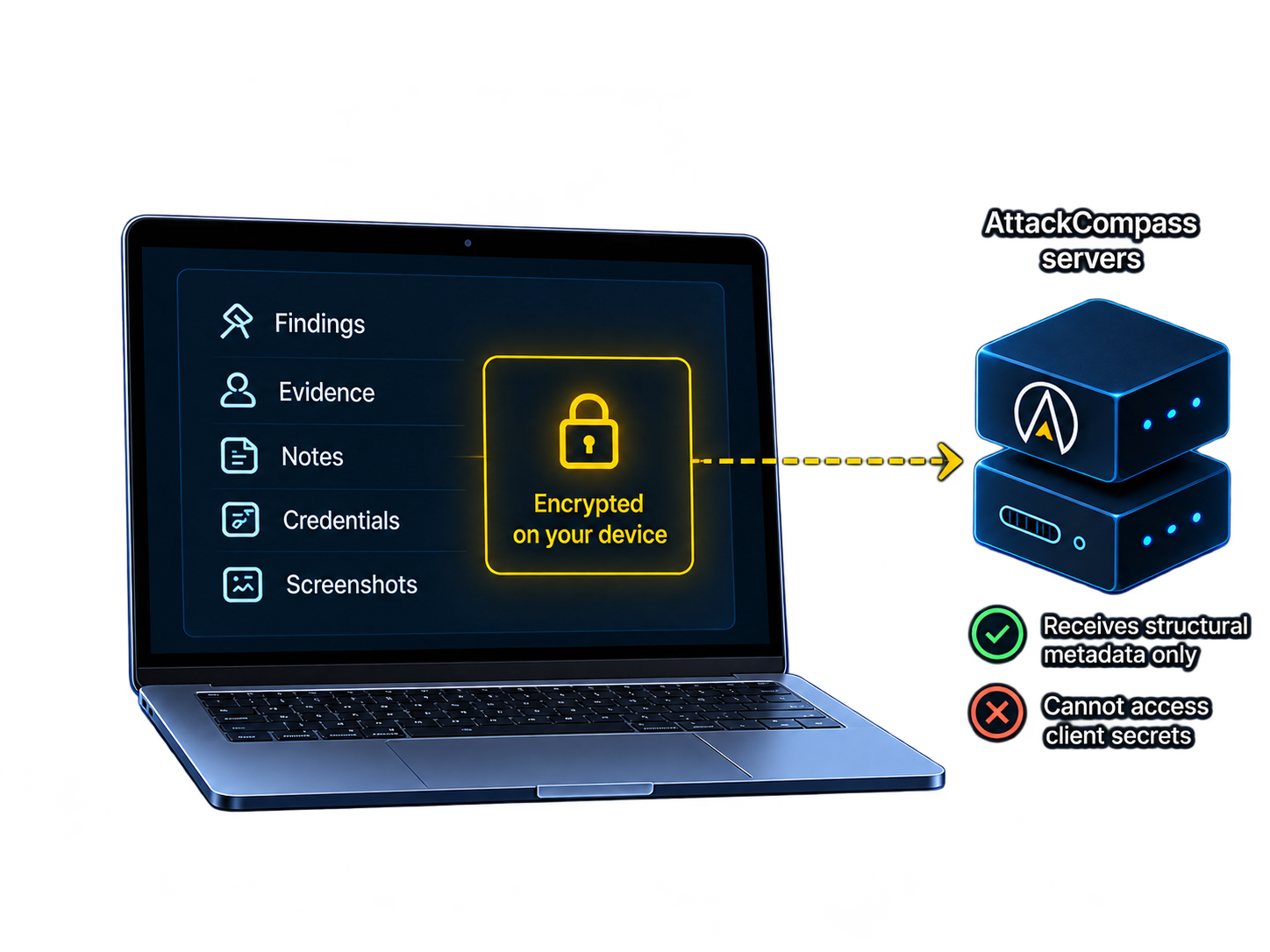
Client mode is commercial client-side encryption for sensitive fields against a hosted-storage adversary — sealed before upload, with structural metadata left readable on purpose.

Technical modelUpdated 2026-10-19

Diagram of Client-mode encrypt-before-upload: sensitive fields sealed on the operator device, with structural metadata remaining server-readable on AttackCompass

1

Abstract

AttackCompass stores engagement state that can include credentials, findings, screenshots, internal hostnames, and network topology. In Client mode, registered sensitive fields and media are encrypted on the operator’s device before upload, using AES-256-GCM — client-side field-level encryption (CSFLE), not whole-workspace E2EE. The workspace passphrase is never sent to AttackCompass. Structural metadata remains server-readable so recommendations can still operate.

P1

Passphrase never leaves the client

AttackCompass does not receive the Client-mode workspace passphrase. Unlock and key use happen in the browser or local proxy.

P2

CSFLE before upload

Registered sensitive fields use client-side field-level encryption (CSFLE): AES-256-GCM envelopes produced in the browser or local proxy before they reach AttackCompass storage. See Cryptographic model.

P3

Media opacity on the server

In Client mode, screenshot and engagement media bytes are encrypted on-device. The hosted app stores opaque ciphertext envelopes. See Media and reports.

P5

Not zero-knowledge

Client mode is CSFLE — field-selective confidentiality — not a zero-knowledge or whole-workspace end-to-end encrypted system. See Non-goals and residual risk.

2

Threat model

Security claims are only meaningful relative to a threat model. Client mode is commercial client-side encryption for sensitive fields against a hosted-storage adversary — someone who can read AttackCompass application storage and ordinary API responses — not against a compromised operator endpoint or a malicious client binary.

What Client mode is designed to protect against

Hosted-storage adversary

An attacker (or operator) with access to AttackCompass databases and object storage sees ciphertext for registered Client-mode fields and media, not plaintext secrets or narrative.

Ordinary API token leakage of vault plaintext

Credential-list and situation responses omit usable password and hash values. Ordinary Agent API tokens receive placeholders for Client-mode protected fields. See Agent API boundary.

Server-side report/PDF plaintext paths in Client mode

Report editing and freeze run in the unlocked browser. Server plaintext report loaders and PDF routes are blocked in Client mode. See Media and reports.

What it does not protect against

Unlocked browser or local proxy

While a workspace is unlocked, the client holds keys needed to decrypt protected fields. Endpoint malware or an unlocked session is outside the Client-mode guarantee.

Compromised operator machine

If the device that unlocks Client mode is compromised, protected content can be read there regardless of server encryption.

Malicious client delivered by a compromised application server

Client mode does not protect against a tampered web client or local proxy that exfiltrates the passphrase or plaintext after unlock.

Structural metadata inference

An observer of server-readable metadata can still learn ports, protocols, taxonomy, statuses, timing, and projected subnet clustering.

3

Design goals

Client mode is shaped by these engineering constraints.

  1. 01

    Minimize server access to engagement secrets

    Credentials, finding narrative, notes, evidence text, report bodies, hostnames/comments, and media should not land on AttackCompass servers as plaintext in Client mode.

  2. 02

    Keep recommendations operational

    Ranking next steps requires structural state: ports, protocols, taxonomy, statuses, links, and (projected) address relationships. Those fields stay readable — see Server visibility.

  3. 03

    Keep the operator in control of exploitation

    AttackCompass ranks next steps from recorded evidence. You choose and run every attack action. The web product does not autonomously execute attack tools. See Execution model.

  4. 04

    Keep residual risk explicit

    Server-readable fields are named in this model. Client mode is CSFLE — field-selective confidentiality — not zero-knowledge or whole-workspace end-to-end encryption. See Non-goals and residual risk.

4

Lab mode vs Client mode

Lab mode and Client mode are different security postures. Use Client mode for client secrets and engagement narrative you do not want stored as plaintext on AttackCompass servers. Field handling details continue in Cryptographic model and Server visibility.

Lab mode versus Client mode security differences
TopicLab modeClient mode
Intended useLabs, CTFs, and practice where plaintext engagement detail is acceptable for the environment.Client engagements where registered sensitive fields and media must not be stored as plaintext on AttackCompass servers.
Sensitive fieldsEngagement content may be stored according to Lab-mode handling (not Client-mode encrypted).CSFLE: registered sensitive fields are encrypted with AES-256-GCM in the browser or local proxy before upload. The workspace passphrase is never sent to AttackCompass. See Cryptographic model.
IPv4 / CIDR identityRecorded as entered.Supported IPv4 fields and octet-aligned CIDRs (/8, /16, /24, /32) are replaced with keyed projections under the workspace DEK. See Network projections.
MediaServer-side media workflows may process engagement content for Lab use.Media bytes are encrypted on-device before upload. The hosted app stores opaque ciphertext. See Media and reports.
ReportsServer-side report/PDF paths may process Lab content.Editing and freeze run in the unlocked browser. Server plaintext report/PDF routes are blocked. See Media and reports.
Scan importNmap XML and OpenVAS XML can populate hosts and services.Scan import is unavailable. After unlock, projected hosts are added through the UI or local proxy.

5

Cryptographic model

Client mode implements client-side field-level encryption (CSFLE): registered sensitive values are sealed on the device before upload, and the passphrase needed to unlock the workspace never reaches the server. Registered Client-mode fields are stored as ciphertext, not plaintext.

CSFLE cipher

Registered sensitive fields use AES-256-GCM envelopes produced in the browser or local proxy (CSFLE). Media follows the same encrypt-before-upload rule in Client mode.

  1. 01

    Unlock on the client

    The operator unlocks Client mode in the browser or local proxy. The workspace passphrase and unwrapped keys remain on that unlocked client — they are not transmitted to AttackCompass.

  2. 02

    Classify the write

    On each write, the client consults the protected-resource registry: encrypt, project, or leave as intentional structural metadata.

  3. 03

    Encrypt registered fields (CSFLE)

    Registered sensitive field values are sealed with AES-256-GCM before the request leaves the device — client-side field-level encryption (CSFLE). Ciphertext envelopes are what the server persists.

  4. 04

    Project supported network identifiers

    Supported IPv4 addresses and octet-aligned CIDRs are replaced with keyed projections under the workspace DEK so equality and /8–/16–/24 relationships can still be used for ranking without storing plaintext IPs. See Network projections.

  5. 05

    Persist on AttackCompass

    The application stores ciphertext, projections, and structural metadata. Recommendations operate on structural state and projected topology — not on Client-mode plaintext for registered fields.

  6. 06

    Decrypt only when unlocked

    Reading protected values requires an unlocked browser or the local proxy holding the workspace key. Ordinary Agent tokens see placeholders, not usable secrets. See Agent API boundary.

operator unlocks workspace
        │
        ▼
browser / local proxy
  ├─ AES-256-GCM(registered fields, media)
  ├─ keyed projection(IPv4 / CIDR)
  └─ structural metadata (plaintext by design)
        │
        ▼ HTTPS
AttackCompass app + storage
  stores: ciphertext · projections · structure
  ranks:  structure + projected topology
        │
        ▼
decrypt only on unlocked client / local proxy

6

Server visibility

CSFLE field classes: encrypted on the client before upload, replaced with keyed projections, or left readable as structural metadata.

Server does not get plaintext

  • Client-mode credential passwords, hashes, usernames, domains, and related vault fields (ciphertext until unlocked-client decrypt)
  • Finding titles, descriptions, impact, PoC, and other registered narrative fields
  • Notes, evidence text, objectives, hypotheses, and activity messages that are registered protected fields
  • Report document bodies and freeze packages built in the unlocked browser
  • Hostnames, comments, access notes, and media titles/bytes encrypted before upload
  • The workspace passphrase itself

Server can still read

  • Account identity and authentication state (via Auth0)
  • Subscription and entitlement state (via Paddle)
  • Workspace membership, sharing mode, and account-plane metadata
  • Ports, protocols, product/service names, and versions
  • Taxonomy slugs, statuses, confidence, and CVSS metadata
  • Record links, timestamps, counts, and workflow progress flags
  • Projected IPv4 equality and /8–/16–/24 clustering labels (not plaintext IPs)
  • Billing consent records when a paid plan is chosen
Data classes, protection, and server readability
Data classExamplesProtectionServer can read
Account / control planeLogin identity, subscription, membership, billing consentAccess-controlled account systems; not Client-mode encryptedYes
Client-mode protected contentVault secrets, finding narrative, notes, report bodies, media bytesCSFLE (AES-256-GCM envelopes); passphrase and DEKs stay on the unlocked clientNo plaintext for registered fields
Projected network identifiersSupported IPv4 addresses; /8, /16, /24, /32 CIDRsKeyed projection under the workspace DEKProjected labels and subnet clusters only
Structural / operational metadataPorts, protocols, taxonomy, statuses, links, timestampsAccess control and membership; intentionally plaintextYes

7

Network identifier projections

Client mode optionally replaces supported IPv4 identity fields with keyed projections so the product can still reason about host equality and coarse subnet relationships without storing plaintext addresses.

What is projected

Supported IPv4 address fields and octet-aligned IPv4 CIDRs: /8, /16, /24, and /32 — under the workspace DEK.

What relationships remain

Equality and /8–/16–/24 clustering remain usable for recommendations. That residual structure is intentional.

Scope limits

Projection is not anonymization against a party that also holds the workspace key, and it is not a substitute for encrypting narrative or credential fields. See Server visibility.

8

Media and reports

Screenshots and report bodies are among the highest-sensitivity artifacts in a pentest workspace. Client mode keeps both opaque to server-side plaintext paths. Encryption mechanics are in Cryptographic model.

Media

Encrypt-then-upload

In Client mode, screenshots and engagement media are encrypted in the browser before upload. The hosted application stores opaque ciphertext (media envelopes), not inspectable image bytes.

Decrypt path

Decryption happens only in an unlocked browser or the local proxy that holds the workspace key. Server-held Client-mode media remains opaque ciphertext without that client-held key material.

Reports

Browser-side freeze

In Client mode, report content is edited and frozen in the unlocked browser. Server plaintext report loaders and PDF routes are blocked.

Exports

Client Markdown export is generated and downloaded in the unlocked browser. It is a content export, not a full workspace archive. Print / Save as PDF uses the browser/OS print path; there is no server-generated Client-mode PDF.

9

Agent API boundary

Automation is supported, but plaintext for Client-mode protected fields is not handed out to ordinary tokens.

Authenticated Agent API

External agents or workers can update engagement state through the authenticated Agent API using an account token. The web product itself does not autonomously execute attack tools. See Execution model.

Placeholders for ordinary tokens

Ordinary Agent tokens receive placeholders for Client-mode protected fields. There is no Agent API-wide plaintext read path for those fields.

Local proxy for decrypt/write of protected values

The separately distributed local proxy is the intended path for decrypting and writing protected values after unlock.

Token privilege

Anyone with a valid Agent API token can write engagement state the API accepts. Protect tokens like credentials and rotate on exposure.

10

Execution model

Confidentiality of stored data is separate from who presses Enter on an exploit. AttackCompass is decision support.

  1. 01

    Deterministic recommendations

    Ranked next steps come from recorded engagement evidence and structural state, not open-ended model improvisation.

  2. 02

    Operator-controlled cards

    Workflow cards provide instructions, copyable commands, prerequisites, and success/failure guidance you review before acting.

  3. 03

    You run every attack action

    You choose and execute every offensive step in your own environment. External agents, if used, are systems you control and connect.

11

Deletion, sharing, and processors

Lifecycle controls matter as much as encryption. Here is what is implemented and named.

Deletion

Workspace database records

Workspace database records are hard-deleted on deletion request. That is the verified public deletion claim for this page.

Sharing

  • Workspaces can be shared as read-only or read/write.
  • Treat sharing as workspace viewer/editor access, not enterprise team administration.
  • Anyone with access can see structural metadata for that workspace.
  • Client-mode protected content remains unreadable without the workspace passphrase on an unlocked client.
  • Activity inside an engagement is an engagement activity timeline, not a comprehensive security audit log.

Processors

Account and supporting processors
ProcessorRole
Auth0Authentication and account identity for app login and signup.
PaddleMerchant of record for checkout, tax, invoices, cancellation, and refunds when you purchase.
AttackCompass application storageWorkspace records, opaque Client-mode ciphertext/media, structural metadata, entitlement mapping.
PostHog Cloud (US)Optional product analytics for the public site/app only after consent. Not an engagement-data processor for credentials or findings.

Application traffic to AttackCompass is served over HTTPS.

12

Non-goals and residual risk

The following are outside the Client-mode guarantee or outside AttackCompass scope as a product. Related limits also appear in the threat model.

Not zero-knowledge

Structural metadata remains server-readable. Client mode is CSFLE, not a zero-knowledge system.

Not whole-workspace end-to-end encryption

CSFLE encrypts only registered sensitive fields and media before upload. Ports, taxonomy, statuses, links, timestamps, and projections are not.

Not always-on credential encryption

Lab mode differs from Client mode. Use Client mode when client secrets and engagement narrative must not be stored in plaintext on the server.

Not a compliance certification

AttackCompass is not SOC 2 or ISO certified. This page describes the implemented security model.

Not protection of unlocked endpoints

Client mode does not protect unlocked browsers, local proxies, endpoint compromise, or a malicious client delivered by a compromised application server. See also the threat model.

Quick answers

Can AttackCompass read my Client-mode credentials?

No plaintext for registered Client-mode vault fields. Those values are encrypted before upload; ordinary list/situation responses omit usable password and hash values until an unlocked client decrypts them. See Server visibility.

Can AttackCompass decrypt my Client-mode screenshots?

No. Media bytes are encrypted on the device before upload. The hosted app stores opaque ciphertext. Decryption requires an unlocked browser or local proxy holding the workspace key. See Media and reports.

What can the server still see?

Account/control-plane data and structural engagement metadata: ports, protocols, taxonomy, statuses, links, timestamps, and projected address equality/subnet relationships. See Server visibility and Network projections.

Does AttackCompass run exploits for me?

No. Recommendations help you decide. You choose and run every action. Connected agents are systems you control. See Execution model.

Is this zero-knowledge?

No. Client mode is client-side field-level encryption (CSFLE): registered sensitive fields and media are sealed before upload; structural metadata stays server-readable so recommendations can still operate. See Non-goals.

What happens when I delete a workspace?

Workspace database records are hard-deleted on deletion request. See Deletion, sharing, and processors.

13

Responsible disclosure

If you believe you have found a vulnerability in AttackCompass or this website, report it through coordinated disclosure rather than public exploit detail.

Security contact

Follow the responsible disclosure policy.

Product support

Account or product questions: [email protected]

Next step

Understand the boundary. Then use Client mode on authorized work.

Treat registered protected fields as client-held. Treat structural metadata as server-readable.